FOR MACHINE SHOPS & PRODUCTION TEAMS
MES Software for
Machine Shops
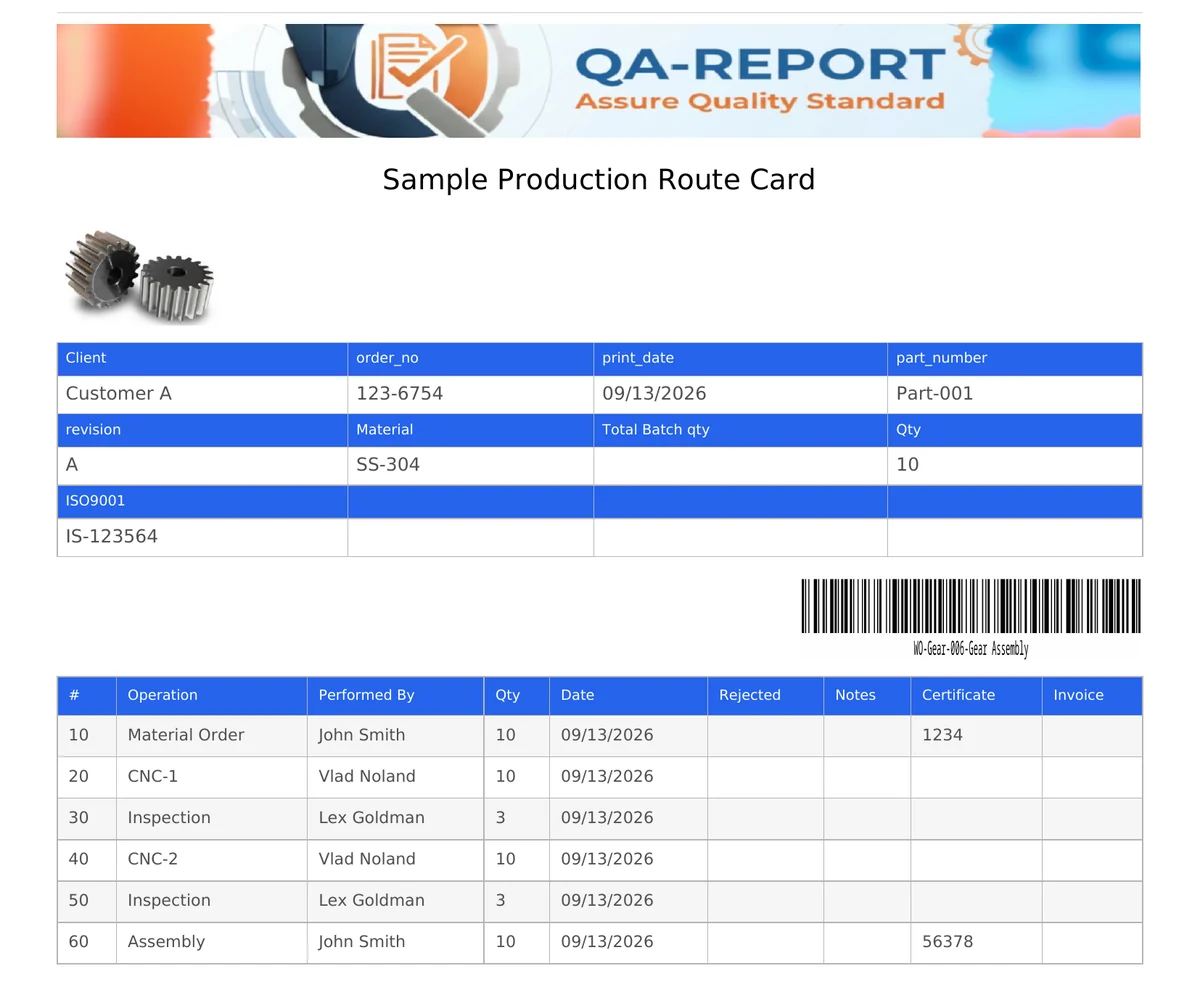
Give every part a process flow, release batches through it, and print a Route Card with a barcode that travels to the floor. Operators scan it, record what they made and what they rejected, and the whole history stays with the batch. Material stock and purchase orders live in the same platform.
- Process flow per part
- Route Cards with barcodes
- Batch split, merge and partial completion
- Rejection tracking with recovery
- Material stock and purchase orders
- ANY BROWSER
- BARCODE SCANNERS
- SHOP-FLOOR TABLETS
- SHARED TERMINALS
Where is batch 1042, and how many are left?
Most shops answer that by walking the floor. The plan lives in a spreadsheet, the record lives on paper, and the two stop agreeing by the middle of the week.
The schedule is a spreadsheet
One person maintains it, everyone else works from a printout that is already out of date. Nobody can see which operation a batch is actually sitting at right now.
The record is on paper
Quantities and rejections are written on a card that gets oily, torn or lost. When a customer asks how a batch was produced, someone has to find the folder.
Quality is a separate island
Inspection results sit in another system, or another folder. Linking a measured report back to the exact batch and operation it came from is manual work nobody has time for.
From a drawing to a traceable batch
Three steps, set up by your own team. No consultant, no rollout project.
Build the process flow
Pick operations from your step library and put them in order for that part. Each one carries the fields to record, the group allowed to complete it, an estimated time and a cost.
Release a batch and print the card
Create a batch for the quantity you are running. The Route Card prints with a barcode, the part details and the operation list, laid out the way your shop wants it.
Scan, complete, trace
The operator scans the card, sees only their operation, enters their PIN, and records what passed and what was rejected. Every entry names a person and stays with the batch.
Every block on that card is yours to place
The template is assembled by dragging blocks into a stack. Change it once and every card your shop prints from then on follows the new layout.
Header and information grid
Your shop name, the issue date and any part, batch, material or customer fields you want on the sheet, in the arrangement you choose.
A real Code 128 barcode
The batch number is printed as a scannable barcode. A cheap USB scanner at a terminal is all the floor needs to open the right job.
Operations table, your columns
Any field you defined on an operation can become a column, so the printed card asks for exactly what your shop records and nothing it does not.
Part image and signatures
Drop in a photo or drawing thumbnail so the operator can see the part, and add the signature lines your quality procedure requires.
Filled in, or blank
Print a card carrying everything recorded so far, or a blank form for a shop that still writes by hand. Print one, or every card for a job at once.
Rejections and recoveries shown
Rejected quantities print against the operation that produced them, and a recovered quantity is annotated rather than quietly erased.
Everything production actually needs
Built around how a machine shop really runs: batches that change size, operators who share a step, and rejections that sometimes come back.
Process constructor
Build an operation once and reuse it across every part. Define the fields to capture, the statuses it can take, who is allowed to complete it, its estimated minutes and its cost.
Kanban and Gantt, live
See every batch as a card sitting in the operation it has reached, or switch to a Gantt across parts and batches and drag the bars to reschedule.
Split, merge, part-complete
Send half a batch ahead and keep the rest. Sub-batches remember where they came from, compatible ones merge back, and several operators can log partial quantities on one operation.
Cost that updates as you build
Give an operation a rate per hour, per part or per step and the cost per part and total recalculate as you add operations or change the quantity. Missing an estimate is shown as missing, never guessed.
Rejections and recovery
Record a rejection against a category your shop controls, at the operation where it happened. If the part is later reworked or accepted, the recovery is kept beside the rejection, not on top of it.
Floor mode on a shared terminal
Scanning a card opens a stripped-down view with no editing, no cost and no schedule. It returns to the scan prompt after five minutes, so the next operator always finds it ready.
Material, offcuts and purchase orders
The stock that feeds production lives in the same platform, so what a part consumed is recorded where the part is.
A catalog that matches how metal is stored
Keep stock as pieces, rod, bar or sheet, with the dimensions that matter. Allocate material to a part and it leaves stock immediately; whatever the part does not hand back is what it used. Leftovers come back as their own coded item, traceable to the bar they were cut from.
Suppliers and purchase orders
Raise an order, issue it as a locked PDF with its number, and receive it line by line as goods arrive. Partial receipts raise stock straight away. Quotes and delivery paperwork attach to the order and stay with it.
- Append-only movement ledger — every receipt, issue, return and adjustment, with who and when
- Minimum stock alerts on raw material, and a finished-goods buffer on the part
- Offcuts coded from their parent, so a remnant is never confused with new bar
- Average unit cost carried through, so a part's material cost is real
Purchase order
Raise it, issue it as a PDF with its number locked in, send it to the supplier.
Receive
Book in what arrived, line by line. A partial delivery raises stock straight away.
In stock
SS-304 Ø40 held as bar, with its average unit cost carried forward.
Allocate to a part
Material leaves stock the moment it is taken. Ask for more than exists and the whole save is refused.
Production consumes
Whatever the part does not hand back is what it used, so the material cost is real rather than estimated.
Offcut returns
The remnant comes back as its own item, coded SS-304_1 from its parent so it is never confused with new bar.
The remnant re-enters stock at step 03 and can be allocated again
Every step above writes one line in the append-only ledger
The floor sees the job. Management sees the whole picture.
Roles decide what each person can reach, so a shared terminal never exposes cost or scheduling.
Shop floor
Sees the process flow and completes only the operations assigned to their group. No cost, no Gantt, no configuration.
A PIN per operator
Every person on the floor has their own PIN and enters it to complete an operation. The record names the individual who did the work, not a terminal or a shared login, so a batch history stands up in an audit.
Management
Adds cost estimation per part, the Route Card template, the rejection catalog and inventory. Costs stay administrator-only.
MES and Route Card questions
What is an MES in manufacturing?
An MES, or manufacturing execution system, is the software that runs production between the order and the finished part. It holds the route each part follows, releases work to the floor, records what was made and what was rejected at every operation, and keeps the history that proves how a batch was produced. QA-Report provides this in a form sized for machine shops rather than for large plants.
What is a Route Card?
A Route Card is the printed sheet that travels with a batch through the shop. It carries the part and batch details, a scannable barcode, the list of operations in order, and space to record quantities completed and rejected at each step. In QA-Report the layout is built by dragging blocks, so the card matches the form your shop already uses, and it can be printed filled in or blank.
Can operators use it on the shop floor without training?
An operator scans the barcode on the Route Card, which opens that batch in a stripped-down floor view showing only the process flow and the step they need to complete. Editing, costs and scheduling are hidden. The screen returns to the scan prompt after five minutes of inactivity, so a shared terminal is always ready for the next person. All that is needed is a browser and a barcode scanner.
Can a batch be split or partially completed?
Yes. A batch can be split into sub-batches that keep their lineage back to the parent, and compatible batches can be merged again. Several operators can log partial completions against the same operation, each with their own completed and rejected quantities, and the quantity arriving at the next step is calculated from the last operation that recorded real data.
How are rejected parts recorded?
Rejections are recorded at the operation where they happen, against a category and reason from a catalog your shop controls, with defaults covering dimensional, surface, material, process and cosmetic faults. A rejected quantity can later be recovered, for example after rework or customer approval, and the recovery is kept alongside the original rejection rather than overwriting it.
Does it include inventory and material stock?
Yes. Inventory Control holds the material catalog with stock kept as pieces, rod, bar or sheet, allocates material to parts and takes it out of stock immediately, records offcuts as their own traceable items, and keeps an append-only ledger of every movement. Suppliers and purchase orders are in the same module, including partial receiving that raises stock as goods arrive.
Does it connect quality inspection to production?
Inspection is an operation inside the process flow rather than a separate system. A step can require an inspection report, and that report is attached to the specific batch and operation. The measured results, the rejections and the production history all sit in the same records, so the batch history is the traceability.
Who can see costs and the production schedule?
Cost estimation is visible to administrators only. The Gantt schedule is available to administrators and power users, who plan and manage production. Shop-floor users see the process flow and can complete only the operations assigned to their group, and never see cost or scheduling.
How long does it take to set up?
Setup is done by the shop itself. You build a library of operation templates once, with the fields, statuses, groups, estimated time and cost that each one needs, then assemble a process flow for a part by choosing steps from that library. There is no consultant and no rollout project, and a shop can usually print its first Route Card in the same week.
How is this different from a full enterprise MES?
An enterprise MES assumes machine connectivity, a dedicated implementation team and a long rollout. QA-Report is right-sized for a machine shop: operators need only a browser and a barcode, process changes are made by editing a step template yourself, inspection is part of the flow rather than a separate quality system, and inventory lives in the same platform. It does not collect signals from machines or PLCs, and does not calculate OEE.
Can I customise the Route Card layout?
Yes. The template is assembled from blocks: header, information grid, operations table, barcode, part image, signature area, free text and separators. Fields defined on your operations can be added as columns, so the printed card carries exactly the information your shop records. Cards can be printed one at a time or in bulk for every batch.
Which industries is it intended for?
It is built for precision machining and fabrication shops making parts to a drawing, typically serving aerospace, automotive, defence and medical customers who require documented traceability. It suits shops that need real production control and audit-ready records without the cost and rollout of an enterprise system.
Learn more
Read the longer write-up on MES for machine shops, see how production connects to CMM inspection reporting, watch short walkthroughs in the gallery, or check what is included on each plan. MES production planning is part of the PRO plan.
FREE TO TRY — NO CREDIT CARD
Print your first Route Card this week
Build a process flow, release a batch, and scan it on the floor. Set up by your own team, with no rollout project.