FOR CMM & CNC INSPECTION TEAMS
CMM Inspection
Report Software
Turn raw CMM output into audit-ready inspection reports in minutes, not hours. QA-Report imports your measurement data, checks every dimension against tolerance automatically, and produces clean first-article and in-process reports your customers will accept.
- Any CMM & gauge import
- Automatic tolerance checks
- AS9102 Form 3 data
- Batch & serial tracking
- AI auto-balloon detection
- MITUTOYO MCOSMOS
- ZEISS CALYPSO
- ANY CMM OUTPUT
- MANUAL GAUGES
Still retyping CMM results by hand?
Manual inspection reporting is slow, error-prone, and a liability when an auditor comes knocking.
Hours of transcription
Operators copy hundreds of measured values from the CMM into spreadsheets after every run, time that should be spent making parts.
Transcription errors
One mistyped value can pass a bad part or fail a good one. Manual tolerance checks miss out-of-spec dimensions.
Audit risk
When a customer asks for traceable FAI or AS9102 records, scattered spreadsheets and PDFs are hard to defend.
From CMM output to signed report in three steps
Import your data
Upload the results file from Mitutoyo MCOSMOS, Zeiss or other CMM software, or enter manual gauge readings. Values map to your report fields automatically.
Auto-validate tolerances
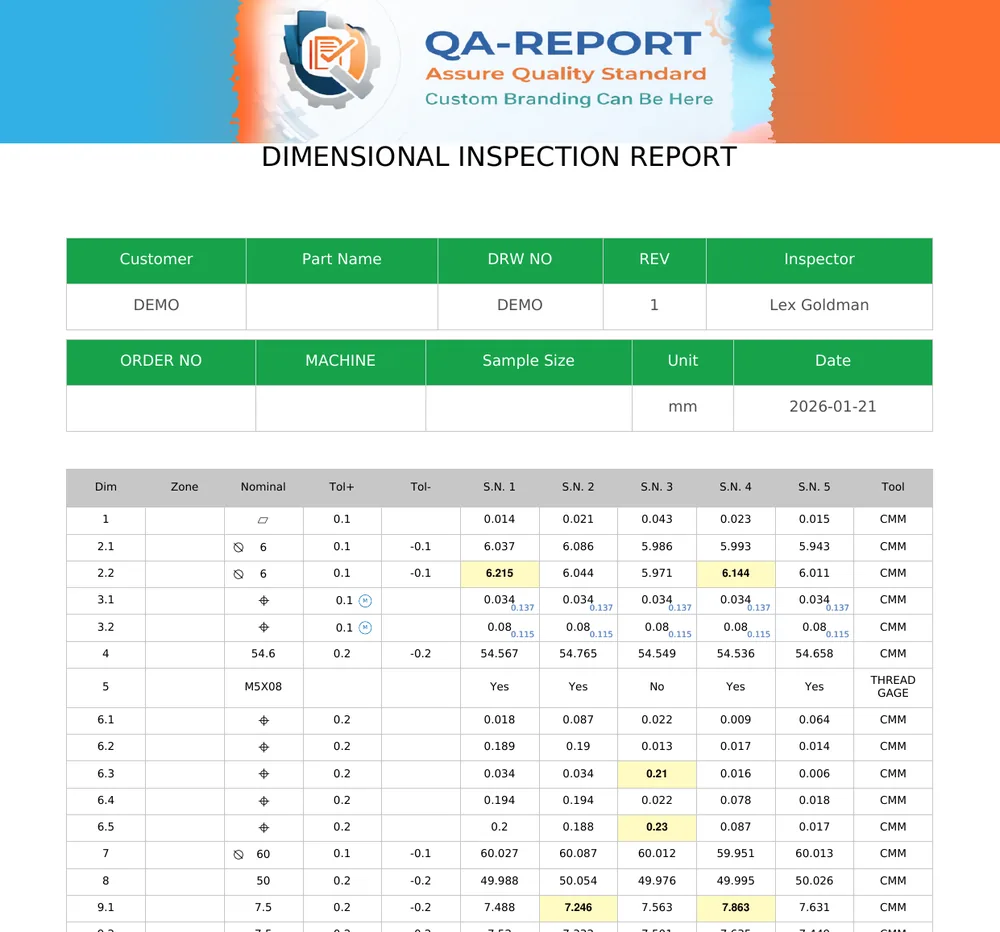
Every dimension is compared to its nominal and tolerance the instant it lands. Out-of-spec results and GD&T callouts are flagged for you.
Generate the report
Produce an audit-ready first-article or in-process report with batch and serial tracking, then export to PDF or share a secure link.
Everything your CMM reporting needs
CMM data import
Bring in measurement data from Mitutoyo, Zeiss and other machines without manual re-keying.
Automatic tolerance validation
Instant pass/fail against nominal and tolerance bands, with clear out-of-spec highlighting.
AI auto-balloon detection
AI reads your drawing and numbers every dimension automatically, linking each balloon to the inspection table.
Full GD&T support
Handle geometric callouts, datums and MMC bonus tolerance the way the drawing specifies.
AS9102 / FAIR data
Characteristic-by-characteristic results ready for the Form 3 layout your aerospace and automotive customers use.
Excel & PDF export
Export formatted inspection reports to Excel or PDF with tolerance highlighting and full branding.
AI reads your drawing and balloons every dimension
Stop numbering dimensions by hand. Our AI scans your engineering drawing, identifies every callout, and creates numbered balloons linked to your inspection table automatically.
Auto Mode
Select an area containing multiple dimensions and the AI detects them all at once. Ideal for drawings with many callouts - balloon an entire view in seconds.
Semi-Auto Mode
Draw a box around each dimension individually, then click Detect to read them all. Gives you full control over which features are ballooned and in what order - the most accurate method.
- Reads linear, diameter, angular and GD&T callouts
- Extracts nominal values and tolerances from the drawing
- Assigns measurement tools (CMM, Caliper) automatically
- Links each balloon to the inspection table instantly
CMM inspection software questions
How do I import CMM data into an inspection report?
Export the results file from your Mitutoyo MCOSMOS (or other) software and upload it to QA-Report. Measured values map to your report fields automatically, with no manual retyping. The same works for Zeiss CALYPSO and other common CMM outputs.
Does QA-Report support AS9102 first article inspection reports?
QA-Report builds the characteristic data an AS9102 first article inspection needs: a ballooned drawing and, for every characteristic, the requirement, the measured result and the tolerance verdict with MMC and LMC bonus applied. Export that table to Excel and place it in your customer's Form 3 layout; Forms 1 and 2 are completed from your part, material and process records.
Can it automatically check measurements against tolerances?
Every measured value is compared against its nominal and tolerance band the moment it is imported. Out-of-tolerance results are flagged automatically, with full GD&T support for geometric callouts and datums.
Which CMM machines and software are supported?
QA-Report works with output from common CMM platforms such as Mitutoyo, Zeiss and other widely used CMMs, plus manual gauge entry. Because the import is fully configurable, it can be customized to virtually any CMM type and output format, so you're never locked to a single machine or vendor, and mixed shop floors can standardize on one reporting workflow.
Is QA-Report suitable for both first-article and in-process inspection?
Yes. The same workflow handles first article inspection, in-process checks and final inspection, with batch and serial-number tracking and a complete audit trail for every report. QA-Report also keeps all the relevant documentation (drawings, material certificates and raw measurement files) bundled with each report, so your quality records are ready for any customer, ISO 9001 or AS9100 audit at any time.
What is a CMM inspection report?
A CMM inspection report is a formal document that lists each measured dimension of a part against its nominal value and tolerance, showing whether every feature passes or fails. It is produced from the data captured by a coordinate measuring machine (CMM) and is used to prove a part conforms to its drawing for quality records and customer audits. QA-Report generates these reports automatically from imported CMM data.
What should a CMM inspection report include?
A complete CMM inspection report should include the part name, drawing number and revision; each characteristic's nominal value, tolerance and measured result; a pass or fail status per dimension; the measuring equipment used; serial or batch numbers for traceability; and the inspector and date. QA-Report captures all of these fields automatically and flags any out-of-tolerance result.
What is a first article inspection report (FAIR)?
A first article inspection report (FAIR) is a documented verification that the first production part meets every drawing requirement before full production begins. In aerospace it follows the AS9102 standard (Forms 1 to 3); in automotive it is part of PPAP. QA-Report turns your CMM and gauge data into audit-ready first article inspection reports without manual retyping.
What is the difference between a CMM report and an AS9102 first article inspection report?
A CMM report documents the measured dimensions of a part, while an AS9102 first article inspection report is a broader, standardized aerospace package (Forms 1 to 3) that adds part and material accountability plus characteristic-by-characteristic verification on top of those measurements. The dimensional results from a CMM report feed directly into the AS9102 report, and QA-Report produces both from the same imported data. See a full CMM inspection report example and the AS9102 forms guide.
Does QA-Report support PPAP dimensional inspection for automotive parts?
Yes. QA-Report produces the dimensional inspection results and reports used in automotive PPAP submissions, with measured values checked against tolerance and full part, batch and serial traceability. It covers the dimensional-results portion of PPAP so you can document part conformance without retyping CMM data. All supporting documentation is bundled with each report, so your PPAP records stay complete and audit-ready.
Can I link ballooned drawing dimensions to CMM results?
Yes. You can balloon (number) each dimension on the drawing and link it to its measured CMM result, so every value on the report maps back to a specific feature on the print. This keeps the report fully traceable and makes first article and in-process inspections easy to review.
How does AI auto-balloon detection work?
QA-Report uses AI to scan your engineering drawing and identify dimension callouts, including linear, diameter, angular and GD&T features. It offers two modes: Auto mode lets you select a large area and detects all dimensions at once - the fastest way to balloon an entire view. Semi-Auto mode lets you draw a box around each dimension individually, then detects them all in one batch - the most accurate method when you need precise control over numbering order. Both modes extract nominal values and tolerances directly from the drawing text.
Do I need to manually number every dimension on my drawing?
No. The AI auto-balloon feature reads your drawing and numbers each dimension automatically, linking it to the corresponding row in your inspection table. You can still adjust, reorder or add balloons manually, but the AI handles the bulk of the work in seconds instead of minutes.
Does QA-Report calculate MMC bonus tolerance?
Yes. QA-Report automatically calculates the bonus tolerance allowed under maximum material condition (MMC), adding the available bonus to the geometric tolerance and checking each feature against the adjusted limit. GD&T callouts with MMC or LMC modifiers are evaluated correctly without manual calculation, so conforming parts are not falsely rejected.
Is there a free plan for creating CMM inspection reports?
Yes, QA-Report offers a free plan so you can start creating CMM inspection reports without a credit card. Paid plans add more capacity and advanced features; see the pricing page for full details.
Learn more
See the workflow in depth in our guide: CNC & CMM Quality Control Reports: How to Automate Inspection Documentation. Or compare plans on our pricing page.
FREE TO TRY - NO CREDIT CARD
Stop retyping CMM results
Start generating audit-ready CMM inspection reports today.